Trivia Sets: Creating, Editing, and Publishing Trivia Game Shows
A Trivia Set is a complete, playable trivia game show built from your question library. It defines how questions are grouped, paced, narrated, voiced, themed, and ultimately played in the Trivia Night engine.
If the Question Builder is where you create content, the Trivia Set Builder is where you create the experience.
What Is a Trivia Set?
A Trivia Set contains:
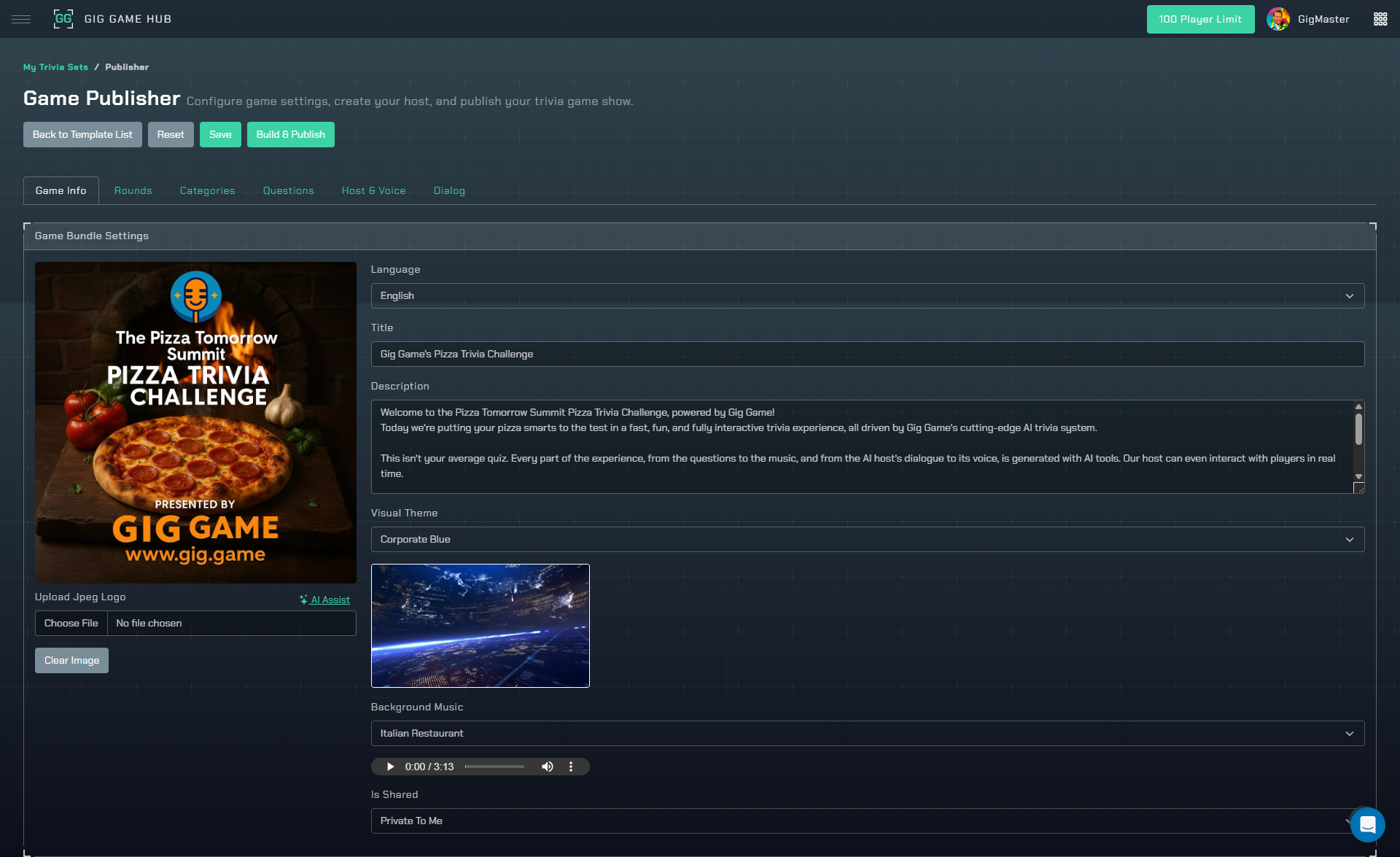
- A title and description
- A language
- A cover image
- Rounds (with scoring rules)
- Categories (with visual backgrounds)
- A curated list of questions
- Host dialog and narration
- Optional AI-generated voices
- A visual theme and background music
- A publishing state (Draft, Building, Published)
Once published, a Trivia Set can be launched in the Trivia Night player.
Creating a Trivia Set
Create a new Trivia Set from questions
Trivia Sets are always created from existing questions.
Steps:
- Go to the Question Builder
- Select one or more questions
- Choose Create New Game Bundle
- Enter a title for your Trivia Set
- Confirm
The system automatically:
- Copies selected questions into the set
- Creates default rounds
- Creates categories based on question categories
- Assigns default narration settings
Trivia Set Status and Locking
Trivia Sets move through clear states:
- Draft – Fully editable
- Building – AI pipelines are running (locked)
- Published – Live and playable (locked)
- Deleted – Removed from use
⚠️ Once a set is Building or Published, it becomes locked to prevent breaking live content.
You can unpublish a set to return it to Draft (as long as no workflow is running).
Basic Set Settings
Title and Description
- The title is required for publishing
- The description is optional but used by AI dialog generation to shape tone
Language
Controls:
- Dialog generation language
- Player UI language
Automatically set based on your questions (but editable)
Cover Image
Required before publishing
Used in:
- Game selection
- Player loading screens
Can be uploaded or replaced at any time (while Draft)
Visual Theme and Background Music
Each Trivia Set has:
Visual Theme
Controls the UI styling of the game show (colors, layout accents).
Background Music
Plays ambient music during gameplay.
These settings affect presentation only and do not impact scoring or logic.
Here’s the updated, user-facing version of that section, incorporating the important clarification about not needing to use rounds—while keeping the tone consistent with the rest of the documentation:
Rounds: Structure, Scoring, and Optional Use
Trivia Sets support round-based gameplay, but rounds are not required.
By default, a new Trivia Set is created with multiple rounds. However, you can delete rounds until only one remains. When a Trivia Set contains a single round, the Trivia Night player will skip round transitions entirely and simply play through all questions in sequence.
This effectively creates a “flat” trivia game where:
- Players answer a fixed number of questions
- There are no round breaks
- The game ends when the final question is completed
This mode is ideal for:
- Casual trivia nights
- Short-form games
- Practice or warm-up sessions
- Simple “X questions per game” formats
Round Properties
Each round (if used) includes:
- Order (Index) – Determines play order
- Name – Displayed to players and referenced in dialog
- Point value per question – Base score for each correct answer
- Optional point decay – Time-based scoring adjustment
- Round-specific dialog and narration
Point Decay
When enabled:
- Faster answers earn more points
- Slower answers earn fewer points
This encourages urgency and competitive play. If point decay is disabled, all correct answers are worth the same number of points regardless of response time.
Managing Rounds
While a Trivia Set is in Draft status, rounds can be:
- Renamed
- Reordered
- Added
- Removed
⚠️ A Trivia Set must always contain at least one round. Reducing the set to a single round is how you disable round-based gameplay.
Categories and Visual Backgrounds
Categories in a Trivia Set are visual and gameplay groupings, not just labels.
When a Trivia Set is first created, categories are automatically generated based on the categories your questions were assigned to in the Question Builder. This ensures your game starts with a logical structure right away—no extra setup required.
Each category includes:
- Name – Displayed to players during gameplay
- Description (optional) – Internal context or creative notes
- Background image – Used visually when the category appears in the game
Categories and Gameplay Flow
The number of categories in a Trivia Set directly affects how questions are presented during gameplay:
Single category
- Questions are played sequentially, in the exact order you arrange them
- Ideal for linear trivia games, quizzes, and fixed-length experiences
Multiple categories
- The Trivia Night engine assumes category-based gameplay
- Players are prompted to choose between categories
- Question selection is handled dynamically and may be randomized
Tip: If you want full control over question order, keep your Trivia Set to one category.
Editing and Merging Categories
Once inside the Trivia Set editor, you’re free to customize categories specifically for this game, without affecting your original questions.
You can:
Rename categories to better match your theme or audience
- Example: change
SciencetoMad ScienceorBrain Busters
- Example: change
Merge categories by assigning multiple questions to the same category name
- Example: combine
MoviesandTVintoScreen Entertainment
- Example: combine
Re-theme categories visually by changing background images
These changes apply only to this Trivia Set and do not modify your underlying question library.
Automatic Category Cleanup
Categories are automatically managed for you:
- If no questions use a category, it is removed automatically
- Adding or moving questions will create categories as needed
- This keeps your Trivia Set clean and avoids unused or empty categories
How Categories Are Used in Gameplay
Categories are used for:
- Category selection screens
- Visual theming between questions
- Optional category-based dialog and narration
If your game uses a single round or skips category selection entirely, categories still provide visual consistency and organizational structure behind the scenes.
Question Ordering (Sequential vs Category Play)
Questions inside a Trivia Set can be reordered freely, but how that order is used depends on your category setup.
Single category Trivia Set
- Questions are played sequentially, exactly in the order you arrange them
- This is ideal for linear games, quizzes, or “X questions per game” formats
Multiple category Trivia Set
- The Trivia Night engine assumes you want category-based gameplay
- Players are prompted to choose between categories
- Question selection is handled dynamically and may be randomized
- Manual question ordering is not guaranteed to be followed
Reordering questions affects only this Trivia Set and does not change the order of questions in your catalog.
Pro Tip: If you want strict control over question order, use one category in your Trivia Set.
Question Category Assignment (Inside the Set)
You can change which category a question belongs to within the Trivia Set without affecting the original question in your catalog.
This allows you to:
- Merge or rename categories for a specific game
- Re-theme questions without modifying your source library
- Reuse the same question in multiple Trivia Sets with different category structures
How Questions in a Trivia Set Work (Important)
Questions inside a Trivia Set are copies of questions from your catalog.
This means:
- Removing a question from a Trivia Set does not delete it from your question catalog
- Deleting a question from your catalog does not remove it from existing Trivia Sets
- Each Trivia Set maintains its own independent copy of the question, images, and dialog
This design allows the same question to be reused safely across multiple games without unintended side effects.
Removing Questions from a Trivia Set
A Trivia Set must always contain at least one question
Removing a question from a Trivia Set also deletes:
- The question’s copied image
- Any generated dialog or audio associated with that question within this set
⚠️ This deletion applies only to the Trivia Set copy—not the original catalog question.
Global Situation (Host Direction)
The Global Situation is the most important storytelling control in a Trivia Set.
It defines:
- Primary host voice
- Optional secondary host
- Optional guest characters
- Emotional tone and pacing
- Audio filters and overlays
Think of this as directing your hosts, not scripting them.
✔️ “Keep dialog upbeat and fast-paced.” ❌ “Laugh after every sentence.”
This global situation applies everywhere unless overridden.
Dialog Types Explained
Trivia Sets support layered dialog, allowing you to control what is said, who says it, and how it sounds at every stage of the game.
Dialog is organized by where it occurs in gameplay, and each layer can have its own situational rules that influence tone, pacing, and character behavior.
Game-Level Dialog
Game-level dialog applies to the overall flow of the show and is not tied to specific questions.
- Start – Optional cold open before gameplay begins
- Intro – Welcome, instructions, and how to join
- Category Selection – Prompts, reminders, and timeouts when choosing categories
- Outro – Game wrap-up and closing remarks
These sections help establish personality, energy, and structure for the entire game.
Round-Level Dialog
If your Trivia Set uses rounds, each round can include its own dialog:
- Round Intro – Announces the round and its rules
- Score Recap – Leaderboard commentary after a round
- Other Commentary – Optional flavor dialog during a round
Round-level dialog is useful for changing tone as difficulty increases or for highlighting milestones in longer games.
Question-Level Dialog
Each individual question supports its own dialog sequence:
- Pre-Question Dialog – Banter or setup before the question
- Question Reading – Reading the question and answers
- Answer Reveal – Revealing the correct answer and explanation
This allows questions to feel dynamic and conversational instead of robotic.
Situations: Directing the Hosts
Situations are instructions for the AI, not scripts.
They define:
- Which characters speak
- Emotional tone and pacing
- Audio filters and overlays
- How dialog should feel, not exactly what is said
Global Situation
Every Trivia Set has a Global Situation that acts as the default direction for all dialog.
If no overrides are defined, all dialog uses the Global Situation.
Situational Overrides (Per Section)
You can override the Global Situation at any dialog level, including:
- Start
- Intro
- Category Selection
- Each Round
- Question Categories
- Individual Questions
Overrides allow you to:
- Change host energy for a specific section
- Introduce guest characters only in certain moments
- Shift tone (serious → playful → dramatic)
- Apply special audio filters temporarily
These overrides affect only the section they are attached to and do not impact other dialog.
How Situational Weighting Works
Each dialog section can have multiple situations, each with a weight.
When dialog is generated:
- The system randomly selects a situation
- Situations with higher weight are more likely to be chosen
- Weights are relative, not percentages
Example
- Situation A (Weight: 70)
- Situation B (Weight: 30)
Situation A will be chosen about 70% of the time, while Situation B appears less frequently.
Why this matters
Weighting lets you:
- Keep dialog feeling fresh without chaos
- Favor a “main” host style
- Occasionally inject surprise personalities or tones
- Avoid repetitive or monotonous narration
Situations: Best Practices (and Why They’re Powerful)
Situations are optional, but they are one of the most powerful tools in the Trivia Set builder. When used thoughtfully, they allow you to turn a standard trivia game into an ongoing, story-driven game show—without hard-coding behavior.
You’re not just assigning voices.
You’re casting characters and setting up dynamics.
How Situations Build Stories (Without Getting Repetitive)
Situations can be:
- Global (apply everywhere)
- Scoped to specific sections (intro, rounds, questions, answers)
- Targeted to specific categories
- Weighted so they occur occasionally, not constantly
This lets you introduce recurring characters and jokes sparingly, so they stay funny instead of annoying.
Example: Controlled Chaos with Weights
The Cast
- Two primary hosts
- Chet, the grumpy owner of the “game show studio”
- Lexi, Chet’s niece
Your Global Situation might be:
“The hosts are upbeat, professional, and slightly competitive with each other.”
Then you add a Question-level situational override with a low weight:
“Chet interrupts occasionally because he brought his niece Lexi to work today. One host is clearly annoyed by Lexi, but allows her to read a question in exaggerated Gen-Z ‘brain rot’ slang.”
By giving this situation a low weight, the engine will:
- Apply it to only a small subset of questions
- Choose it unpredictably
- Keep the interruption rare and surprising
Most questions run normally. Every once in a while—chaos.
Targeting Specific Categories
You can make situations apply only to certain categories, which gives you even more control.
For example:
Apply the Lexi situation only to:
- Pop Culture
- Internet
- Music
Exclude it from:
- History
- Science
- Serious rounds
This keeps:
- Serious questions clean and focused
- Comedy moments where they make sense
Another Example: A Recurring Rival (Used Sparingly)
You add an auxiliary character:
- Barney’s ex-wife, a former co-host
You create a Score Recap situational override:
“Barney’s ex-wife Liz, a former game show host, occasionally calls into the show after finding one of Barney’s old question boxes. She enjoys checking in on how the show is going and taking subtle digs at Barney. Noticing Barney’s growing discomfort, Sally jokingly invites Liz to read a question on air. Liz smugly reads the question while casually bragging about her new wealthy husband, Brad, and continuing to needle Barney.”
Set this situation with:
- A low weight
- Applied only to score recaps
- Possibly only in later rounds
Result:
- She doesn’t appear every time
- When she does, it feels intentional
- The joke stays fresh across multiple games
Why Weights Matter
Weights let you:
- Control frequency, not just inclusion
- Mix consistent tone with rare surprises
- Prevent jokes from becoming repetitive
- Build long-running story arcs over many trivia nights
Think of weights as probability knobs, not rules.
Situations: Best Practices
✔ Use vague, emotional guidance
- “Playfully annoyed”
- “Smug and self-satisfied”
- “Chaotic but well-meaning”
✖ Avoid specific behaviors
- “Interrupt every question”
- “Laugh after every line”
- “Mention Brad by name every time”
Situations guide tone, not stage direction. Overly specific instructions will be repeated everywhere—and quickly become distracting.
AI Dialog Generation (Optional)
AI dialog generation is available for:
- Start
- Intro
- Categories
- Rounds
- Scores
- Questions
- Outros
AI uses:
- Your Trivia Set title and description
- Global and overridden situations
- Character selections and weights
Recommended Workflow
- Generate dialog text only
- Review and edit scripts
- Adjust situations and weights if needed
- Generate voice audio last
- Publish
This workflow:
- Saves AI tokens
- Prevents costly rework
- Gives you creative control before audio is locked in
Voice Generation / Audio Control
Generate Voice
Converts dialog text into spoken audio using selected character voices and filters.
Audio is generated only when requested, not automatically.
Unlock Voice
Removes generated audio without deleting dialog text.
Use this when:
- You change wording
- You want a different voice
- You want to regenerate audio with updated tone
Cost Estimation
Before generating voice, you can:
- View estimated token cost
- Compare against your remaining balance
- Decide whether to generate all audio or only specific sections
This makes voice generation predictable and budget-friendly.
Final Tip: Think Like a Director
- Use Global Situations for consistency
- Use Overrides for emphasis and variety
- Use Weights for controlled randomness
You’re not writing a script—you’re directing a performance.
Building and Publishing a Trivia Set
Building a Trivia Set prepares it for gameplay. This step is highly flexible—you can build anything from a fully voiced game show to a completely silent, self-paced experience.
Dialog and Voice Are Optional
Dialog and voice are not required for a Trivia Set to function.
A Trivia Night game can run:
- With full dialog and voice acting
- With music only
- Or completely silent, like a timed slideshow of questions
The Trivia Player adapts automatically based on what content is available.
Build Options
When you click Build, you can choose exactly what to generate:
Generate dialog (optional) Creates written host dialog using your situations and settings.
Generate voice (optional) Converts dialog into spoken audio.
Publish automatically when complete Publishes the Trivia Set as soon as all selected build steps finish.
You can generate dialog without voice, voice without regenerating dialog, or skip both entirely.
Dialog Variations (Keeping Games Fresh)
The Build screen allows you to specify how many dialog variations to generate for each section:
- Startup (optional)
- Intro
- Category selection
- Round intros
- Score recaps
- Outros
Each variation is a different version of the dialog for that section.
When to use multiple variations
- If you plan to replay the same Trivia Set multiple times
- For weekly or recurring events
- To keep intros and outros from feeling repetitive
The player will automatically rotate between available variations, giving the game a fresh feel each time it runs.
When to use a single variation
- If the game will be played once
- For one-off events or presentations
- When you want tight, controlled scripting
Recommendation: If you only intend to play a Trivia Set once and want dialog or voice, set each section’s variation count to 1.
Validation Before Publish
To publish a Trivia Set, the following are required:
- A title
- A cover image
- No active build or voice workflow
- Sufficient AI tokens (only if generating dialog or voice)
If you are not using AI-generated content, tokens are not required.
After Publishing
Once published:
- The Trivia Set becomes playable in Trivia Night Player
- The set is locked to prevent accidental changes
- You can still clone the set to create variations or updates
In short: You decide how cinematic—or how simple—your trivia game should be. The build system adapts to your needs, not the other way around.
Cloning Trivia Sets
You can clone any Trivia Set to:
- Create variations
- Translate content
- Experiment safely
Cloning copies:
- Questions
- Categories
- Dialog
- Audio assets
- Visual settings
The clone starts as Draft.
Deleting Trivia Sets
Deleting a set:
- Marks it as deleted
- Preserves data integrity
- Prevents accidental loss during workflows
Only Draft sets can be deleted.
How Trivia Sets Become Playable
Once published, Trivia Sets are run by the Trivia Night player engine, which handles:
- Timers
- Scoring
- QR join flow
- Audio playback
- Visual transitions
👉 See /games/trivia-night.html to understand the player experience.
Final Advice: Build Like a Producer
- Lock your title early
- Test dialog before voice
- Use situations for tone, not behavior
- Prototype small, then scale
- Clone instead of overwriting
Trivia Sets aren’t just data—they’re game shows. Build them like one.
If you want next:
- A quick-start checklist
- A non-AI workflow guide
- Or advanced host scripting examples
Just say the word.
Explore more
- Create Trivia Questions with AI or in bulk: Trivia Question Builder
- See how your questions run in the player engine: Trivia Night Player