How Gig Game Works
Gig Game is designed around a simple idea:
Live games work best when they are hosted, shared, and easy to join.
Rather than focusing on a single game type, Gig Game provides a shared platform that powers multiple live game experiences - all using the same hosting model.
This page explains how the system works, so everything else in the help docs makes sense.
A Platform, Not a Single Game
Many interactive platforms are built around one specific game - trivia, bingo, polling, or quizzes - each with its own isolated workflow.
Gig Game takes a different approach.
Gig Game is a shared game engine that runs multiple independent game apps, all under one platform.
Each game (bingo, music bingo, QR bingo, trivia, and future experiences):
- Has its own rules and gameplay
- Runs as its own application
- Shares the same hosting workflow
- Uses the same player join experience
- Uses the same lead collection system
- Uses the same screen + phone interaction model
This means hosts don't have to relearn the platform every time they switch games.
The Core Hosting Model
Every Gig Game experience follows the same structure:
Hub → Event → Host Console + HUD + Player Phones
Once you understand this model, every game works the same way.
The Gig Game Hub
The Gig Game Hub is the starting point for hosts.
From the Hub, you can:
- Browse available games
- Start a game instantly or schedule one for later
- Manage event details (title, location, notes)
- Configure player sign-in and lead collection fields
- Launch the Host Console and the shared screen (HUD)
Think of the Hub as your control center for managing games and events.
Events: The Key Concept (Sessions = Events)
In Gig Game, every hosted game session is called an Event.
Session = Event (they mean the same thing).
An Event represents one instance of a hosted game at a specific time or place.
When you start an Event, Gig Game generates:
- A unique join code
- A QR code for players to scan
- An event identity with its own settings and state
- A connection to a specific game application
Events can be:
- Instant (“Play Now”) - start immediately
- Scheduled - created ahead of time and started later
Events are also the unit that ties together:
- Players
- Gameplay
- Lead collection
- Scores and results
Parts of Every Gig Game
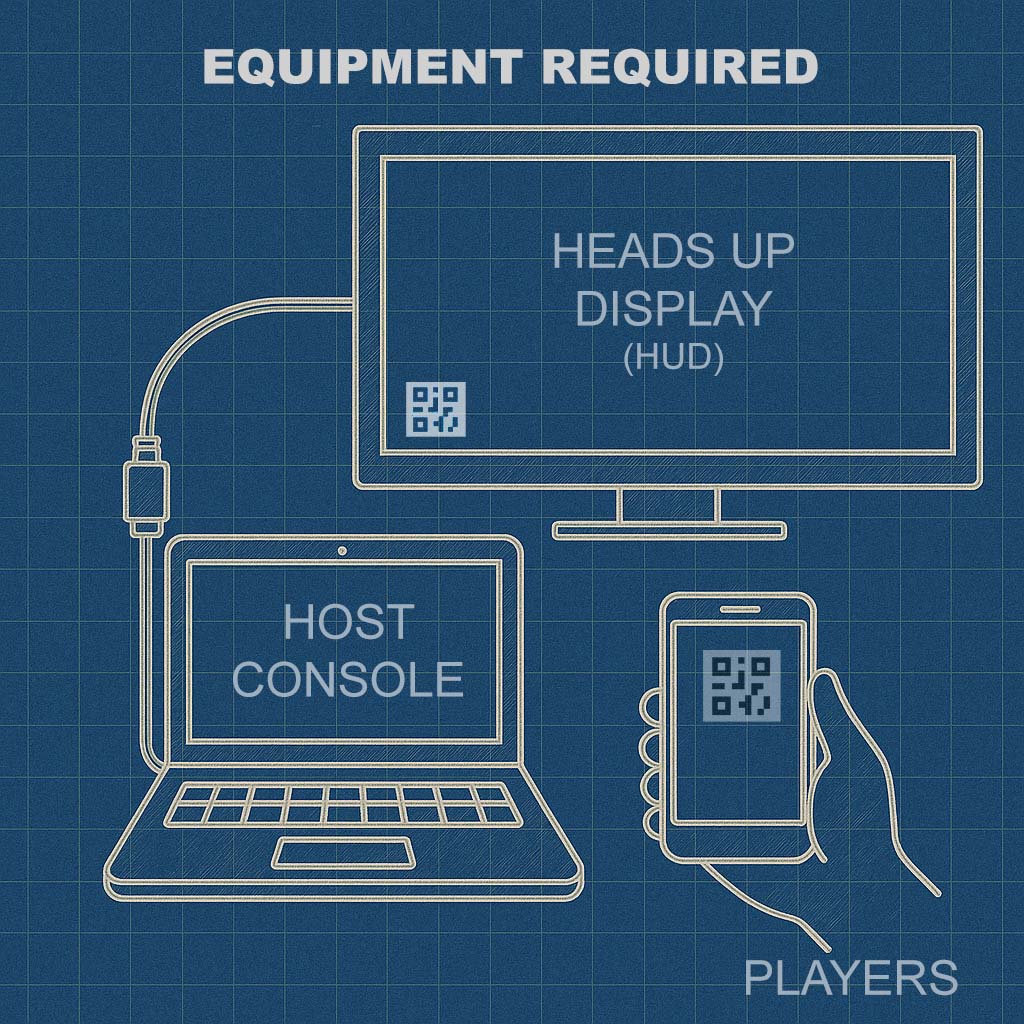
Every Gig Game runs across three connected parts.
1) Host Console
The Host Console is where the host runs the game.
Hosts use it to:
- Start and control the event
- Advance gameplay
- Manage pacing and flow
- Monitor players and progress
- End or restart sessions
The Host Console is typically used on a laptop or tablet.
2) HUD (Shared Screen)
The HUD is the audience-facing display shown on a TV, projector, or monitor.
The HUD typically shows:
- The game's visuals
- Instructions or prompts
- Scores, timers, or progress
- The QR code players use to join
The HUD is what creates the shared, social experience in the room.
3) Player Controllers (Phones)
Players participate using their own mobile phones.
Players join by:
- Scanning the QR code shown on the HUD, or
- Entering a short join code
No apps, downloads, or accounts are required. Everything runs in the phone's browser.
What Players See When Joining
When a player joins an Event, they enter a sign-in flow.
During sign-in, players may see:
- The event title
- Optional host or location details
- Participation instructions
If enabled by the host, players may also be asked to provide:
- Name
- Phone number
- Custom fields
This makes Gig Game suitable for both casual play and lead-driven events.
The Standard Hosting Flow
Most Gig Game events follow this sequence:
- Host selects a game in the Hub
- Host starts or schedules an Event
- Host opens the HUD on a shared screen
- Players join by scanning the QR code
- Host runs the game from the Host Console
- Players participate on their phones
- Host ends the Event when finished
This flow is consistent across all Gig Game experiences.
Why This Model Matters
Because Gig Game uses a shared platform model:
- Hosts can switch games without relearning the system
- Players already know how to join
- Events remain consistent across use cases
- Lead collection and reporting stay unified
- New games fit naturally into the ecosystem
Gig Game isn't a collection of disconnected tools.
It's a hosted game platform built for live, real-world participation.
What to Explore Next
Now that you understand how Gig Game works, you may want to explore:
- The Gig Game Hub and Events - how sessions are created and managed
- Hosting Your First Gig Game - step-by-step walkthrough
- Ai Tokens - what they are, and how they are used
- Game Experiences - bingo, music bingo, QR bingo, trivia, and more
Each guide builds on the same core concepts explained here.